Plate Sample List section
The Sample List section of the Plates page appears below the table of plates when a plate is selected. It shows the samples associated with the selected plate. To open this section, select  Plates on the sidebar menu and then select a plate. You may need to scroll down to see the Sample List section.
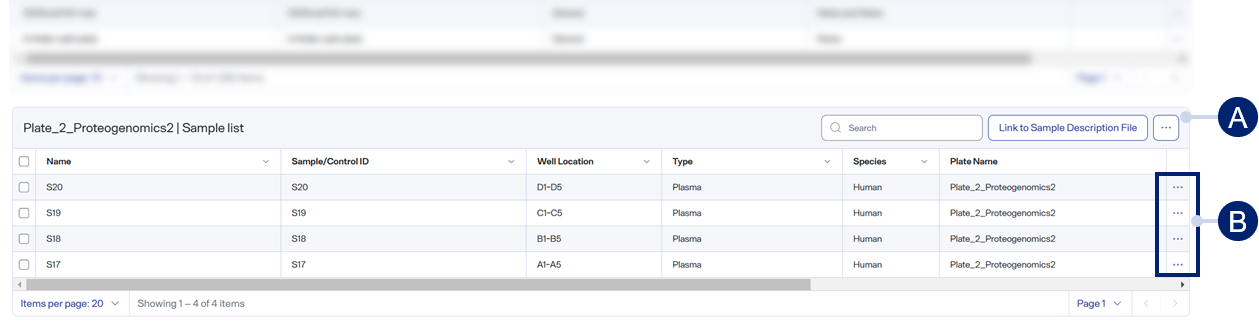
-
Toolbar items
-
Row menu items
Toolbar items
-
 Search — Use to find a specific item. See Search for table items.
 -
Link to Sample Description File — Select to upload a sample description file.
-
 > Display columns — Select or clear checkboxes to show or hide table columns. See Show or hide table columns.
 -
> Add custom columns — Select to see the Add Custom Column dialog box, where you can add a custom column name, description, and notes. See Add custom table columns.
Row menu items
-
>
 — Select to edit information about the selected sample. See Edit sample information.
 -
>
 — Select to delete the selected sample. See Delete a sample from a plate.
Table columns
-
<checkboxes> — Use to select or deselect individual table items. To select all items in the table, select the checkbox in the title row.To clear the checkboxes for all items in the table, select the title row's checkbox again.
-
Tenant ID — The user identification.
-
Name — The descriptive name of a sample.
-
Sample/Control ID — The unique identifier of a sample or control.
-
Well Location — The location of a sample or control in the selected plate.
-
Type — The type of sample: Plasma or Peptide.
-
Species — The selected species for the protocol.
-
Sample Collection Date —The date the sample was collected.
-
Sample Receipt Date — The date your laboratory received the sample.
-
Condition — The categorical group the sample belongs to.
-
Biological Replicate — The biological replicate number.
-
Technical Replicate — The technical replicate number.
-
Plate ID — The unique identifier of the plate.
-
Plate Name — The descriptive name of the plate.
-
Description — The description of the sample.
-
Notes — Additional information about the sample.
-
Created By — The user who created the sample.
-
Created Time — The date and time of the sample was created.
-
Last Modified By — The user who last modified the sample.
-
Last Modified Time — The date and time the sample was last modified.
-
ID — The unique, internal identifier of the sample.