Plates page
Use the Plates page to manage plates and sample information and to upload custom files. To open this page, select  Plates on the sidebar menu.
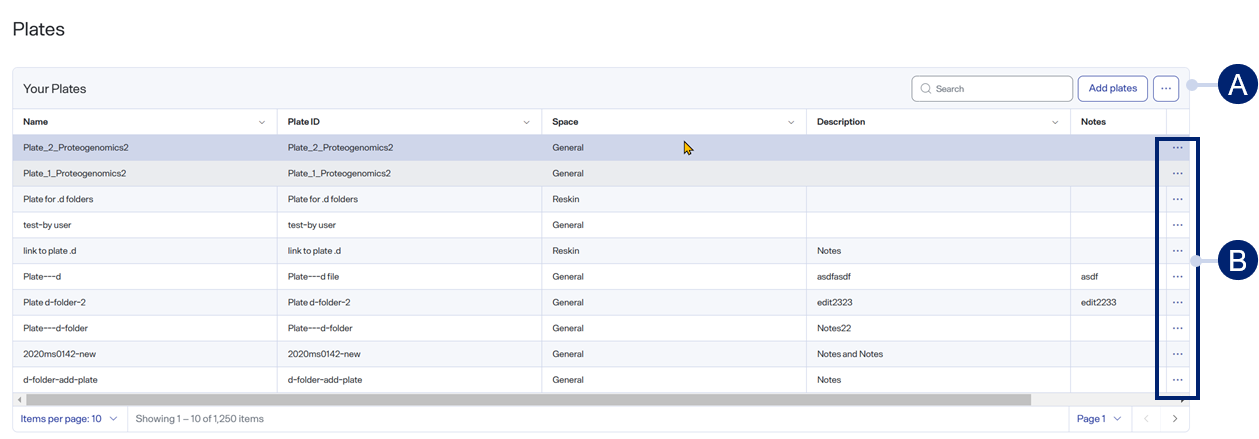
-
Toolbar items
-
Row menu items
Toolbar items
-
 Search — Use to find a specific item. See Search for table items.
 -
Add Plates — Select to add a plate to PAS when setting up an analysis. See Add plate and set up an analysis.
-
 > Display columns — Select or clear checkboxes to show or hide table columns. See Show or hide table columns.
Row menu items
-
>
 Update plates — Select to upload files or folders to the selected plate.
 -
>
 — Select to edit the selected plate. See Edit a plate.
 -
>
 — Select to delete the selected plate.
Table columns
-
Name — The name of the plate.
-
Plate ID — The unique identifier of the plate.
-
Space — The Space to which the plate belongs. For more information, see PAS Spaces.
-
Description — The description of the plate.
-
Notes — Additional information about the plate.
-
Created By — The user who created the plate.
-
Created Time — The date and time the plate was created.
-
Last Modified By — The user who last modified the plate.
-
Last Modified Time — The date and time the plate was last modified.
-
ID — The unique, internal identifier of the plate.
After you select a plate, the Sample list table appears, populated with the samples assigned to the selected plate.